Steam Machine Desk Setup Guide (2026): Best Monitor, Controller, Keyboard, and Mouse for Valve's PC
How to set up Valve's Steam Machine at a desk in 2026: the right 1440p monitor, Steam Controller, keyboard and mouse for Desktop mode, storage, and full build.

Quick verdict: Put the Steam Machine on the desk, pair it with a 27-inch 1440p 144Hz monitor over DisplayPort, buy the Steam Controller bundle, and add a keyboard and mouse for Desktop mode. Skip 4K OLED; the GPU is not built for it.
Quick picks: What it is · Best monitor · Controller and input · Storage · Audio · Placement · Complete build
We may earn a commission if you buy through our links.
Valve’s Steam Machine released on June 25, 2026 through a pre-order queue. It is marketed as a living-room console, but it is also a small Linux PC with a Desktop mode, and a lot of buyers are putting it on a desk. This guide covers what to pair with it there: the monitor its GPU can actually feed, the controller and keyboard question, storage, audio, and where to physically put a 2.6 kg cube.
What the Steam Machine Is and Why It Works at a Desk
The Valve Steam Machine runs a semi-custom AMD Zen 4 CPU with 6 cores and 12 threads up to 4.8GHz at 30W, and an RDNA 3 GPU with 28 compute units at 2.45GHz and 110W. It has 16GB of DDR5 system memory plus 8GB of GDDR6 for the GPU, and a 512GB or 2TB NVMe drive. Valve sells it through Steam; any Amazon listing is a third-party seller, so check the price there against Valve’s.
Valve Steam Machine
Prices change often. Check today's price on Amazon.
Pricing: 512GB is $1,049, or $1,128 with the Steam Controller. 2TB is $1,349, or $1,428 with the controller.
It works at a desk for two reasons. First, SteamOS ships with a Desktop mode, so the same box that boots to Big Picture can run a browser and a file manager with a keyboard and mouse. Second, it is small: 156 by 162.4 by 152 mm, about a six-inch cube. It fits beside a monitor where a tower would not.
The rear has DisplayPort 1.4, HDMI 2.0, two USB-A 2.0, one USB-C 3.2 Gen 2, and gigabit Ethernet. The front has two USB-A 3.2 Gen 1. There is a built-in 2.4GHz adapter for the Steam Controller. The video outputs set the monitor choice, which is next.
Best Monitor
Valve’s performance target is 4K through upscaling from lower internal resolutions. Read that as: the GPU renders at something under 4K and scales up. On a desk, where you sit two feet from the screen, a native 1440p monitor is the natural fit. The GPU has more headroom at 1440p, and 27 inches at 1440p looks sharp at desk distance. The Dell G2725D is a 27-inch 1440p gaming panel in the $250 to $350 range; check its current refresh rate and panel type on the listing.
Dell G2725D
Prices change often. Check today's price on Amazon.
The LG 27GS75Q is the alternative in the same class, a 27-inch 1440p IPS panel from LG’s UltraGear line. Either is more than enough for what the Steam Machine outputs. Use the DisplayPort 1.4 output; HDMI 2.0 tops out at 1440p at 144Hz or 4K at 60Hz, and DisplayPort 1.4 gives you more room for high refresh at 1440p.

A 4K 240Hz OLED is overkill here. The Steam Machine cannot drive 4K at those frame rates natively, and HDMI 2.0 caps 4K at 60Hz anyway. If you already own a 4K OLED, it will work, and the upscaler will do its job. Just do not buy one for this box. Our OLED monitor guide is for people with a GPU to match.
Controller and Input
The Steam Controller is the second-generation pad Valve built for this console. It is sold separately at about $79 based on the difference between the standalone and bundled console prices. The console has a built-in 2.4GHz adapter for it, so there is no dongle to lose. Buy the bundle if you are buying the console new; it is the same price as buying both.
Steam Controller (2nd gen)
Prices change often. Check today's price on Amazon.
For Desktop mode and for shooters, add a keyboard and mouse. The Wooting 80HE is our pick: a Hall effect 80 percent board with rapid trigger and adjustable actuation. It works over USB with no software required, which matters on SteamOS where Windows-only configuration apps do not run. Configure it in Wooting’s browser-based tool. Our Hall effect keyboard guide covers cheaper alternatives.
Wooting 80HE
Prices change often. Check today's price on Amazon.
The Logitech G Pro X Superlight 2 DEX is the mouse. It is around 60g with Logitech’s HERO 2 sensor and a 2.4GHz receiver that plugs into a front USB-A port. Like the keyboard, it works without software; you lose the ability to tweak settings on SteamOS but the defaults are good. Plug the receiver into a front port rather than the rear USB 2.0 ports to keep the cable path short.

Logitech G Pro X Superlight 2 DEX
$159.99 on Amazon (as of Sep 24, 2026) · Price and availability may change. Read our review
Storage Expansion
512GB fills after a handful of large games. The rear USB-C 3.2 Gen 2 port is the fastest external connection on the box at 10Gb/s. A Samsung T7 Shield or a Samsung T9 on that port makes a good game library drive. The T9 is faster on paper but only over a USB 3.2 Gen 2x2 port, which the Steam Machine does not list, so the cheaper T7 Shield is the sensible choice.
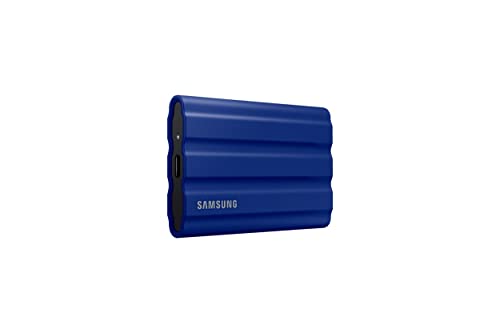
Samsung T7 Shield
$516.92 on Amazon (as of Sep 24, 2026) · Price and availability may change.
Do not use the rear USB-A 2.0 ports for storage; they are for a keyboard or receiver. The front USB-A 3.2 Gen 1 ports work in a pinch at 5Gb/s. We are not claiming a microSD slot or a user-accessible internal drive bay; check Valve’s specs page for the current word on that. If you plan to keep a large library and cannot verify internal expansion, the 2TB model at $300 more is the safer order.
Audio and Headset
The Steam Machine has no listed 3.5mm jack in the port list we have, so plan on USB or wireless audio. A SteelSeries Arctis Nova 7 uses a USB-C 2.4GHz dongle that should work on SteamOS as a standard USB audio device; confirm on the listing that the dongle is the USB variant rather than console-specific. For speakers, a pair with a USB input, or a small USB DAC feeding analog speakers, is the clean route.

SteelSeries Arctis Nova 7
$169.99 on Amazon (as of Sep 24, 2026) · Price and availability may change.
Bluetooth headphones also pair, though latency on Bluetooth is higher than a 2.4GHz dongle, which you will notice in shooters more than in strategy games.
Desk and Mount Placement
The Steam Machine weighs 2.6 kg, or about 5.7 pounds, and has a 110W GPU. It needs airflow. Put it on the desk beside the monitor, on a monitor stand shelf, or on an open shelf above the desk. Do not put it in a closed cabinet or push its vents against a wall. Leave a few inches on the intake and exhaust sides.

A monitor stand with a shelf is the neat solution: it raises the display to eye height and the cube sits under it with cables routed behind. If you use a monitor arm, a VESA-mounted mini PC shelf rated well above 2.6 kg can carry it behind the display. Confirm the weight rating; most VESA PC mounts are designed for lighter boxes. Our gaming desk guide covers desks with the depth to hold all of this.
Complete Build
Approximate totals. Prices move, and the console price is Valve’s.
| Item | Price |
|---|---|
| Valve Steam Machine 512GB with Steam Controller | $1,128 |
| Dell G2725D 27-inch 1440p | $300 |
| Wooting 80HE | $200 |
| Logitech G Pro X Superlight 2 DEX | $160 |
| Samsung T7 Shield 2TB | $150 |
| SteelSeries Arctis Nova 7 | $180 |
| Monitor stand with shelf | $40 |
| Total | ~$2,160 |
Swap to the 2TB console and drop the external SSD and the total lands in the same place with a cleaner desk.
Bottom Line
Treat the Steam Machine as a 1440p desk PC and it makes sense. Buy the controller bundle, run DisplayPort to a 27-inch 1440p 144Hz monitor, plug in a keyboard and mouse that need no software, and add a USB-C SSD when the drive fills. Give it air. Do not buy a 4K OLED for it; the GPU has a target, and it is not that.
Recommended Gear
Products we've reviewed that fit this guide. We may earn a commission if you buy through our links.


Frequently Asked Questions
- What monitor is best for the Steam Machine?
- A 27-inch 1440p monitor at 144Hz or higher. Valve targets 4K through upscaling from lower internal resolutions, so native 1440p is the sweet spot for its RDNA 3 GPU with 28 compute units. The rear video outputs are DisplayPort 1.4 and HDMI 2.0, so use DisplayPort for high refresh rates. A 4K OLED is more display than the GPU can feed.
- Can you use a keyboard and mouse with the Steam Machine?
- Yes. SteamOS has a Desktop mode, and the Steam Machine has two USB-A 3.2 Gen 1 ports on the front, two USB-A 2.0 and one USB-C 3.2 Gen 2 on the rear, plus Bluetooth. Wired or 2.4GHz keyboards and mice work for desktop use and for games that support them. Many games are built around the controller, so keep both.
- Does the Steam Machine come with a controller?
- Not in the base configuration. The 512GB model is $1,049 alone or $1,128 with the second-generation Steam Controller; the 2TB model is $1,349 or $1,428 bundled. The difference works out to about $79 for the controller. The console has a built-in 2.4GHz adapter for it, so no dongle is needed.
- How do I add storage to the Steam Machine?
- The simplest route is an external SSD on the rear USB-C 3.2 Gen 2 port, which runs at up to 10Gb/s. A Samsung T7 Shield or T9 works well for a game library. Whether the Steam Machine has a microSD slot or a user-accessible internal drive bay is something to check on Valve's specs page; we are not claiming either here.
- How big is the Steam Machine and does it need ventilation?
- It measures 156 by 162.4 by 152 mm, roughly a six-inch cube, and weighs 2.6 kg, or about 5.7 pounds. It has a 30W CPU and a 110W GPU, so it produces real heat under load. Give it open air on the desk or a shelf; do not bury it in a closed cabinet or push it against a wall.
Related Guides

Best Gaming Desks in 2026: Size, Build Quality, and Cable Management
The best gaming desks in 2026 ranked by size, stability, and built-in cable management. Covers budget, mid-range, and premium picks for every setup.

Best Hall Effect Keyboards in 2026: Rapid Trigger for Gaming and Typing
The best Hall effect keyboards in 2026 with rapid trigger and adjustable actuation. Top pick: Wooting 80HE. Covers magnetic switches, SOCD rules, and wireless.

Best OLED Monitors for a Desk Setup in 2026: 4K 240Hz, Ultrawide, and Budget Picks
The best OLED monitors for a desk setup in 2026, from 27-inch 4K 240Hz to 49-inch ultrawide. Top pick: Alienware AW2725Q. Covers burn-in, text clarity, ports.

Best Ergonomic Gaming Chairs in 2026: Chairs That Support 8-Hour Sessions
The best ergonomic gaming chairs in 2026, led by the Secretlab Titan Evo NanoGen. Adjustable lumbar, 4D armrests, sizing, and what to skip.
Setup Inspiration
All setups →
Budget Student Setup Under $400
A complete student desk setup for under $400 that handles studying, online classes, and casual browsing. Proof that great setups don't need huge budgets.
Total: $385

RGB Gaming Battle Station with Dual Monitors
A fully loaded gaming setup with dual monitors, custom mechanical keyboard, and tasteful RGB lighting. Built for competitive gaming and weekend streaming.
Total: $2,400

Grovemade Desk Setup: Premium Wood Accessories Build
A desk setup anchored by Grovemade walnut wood accessories: shelf, keyboard tray, and desk pad. Built around quality materials and an intentional aesthetic. Total cost: $2,120.
Total: $2,120