Best Coding Setup Under $1,000 in 2026: Exact Parts List
The best coding setup under $1,000 in 2026: Dell 27-inch monitor, Keychron keyboard, Logitech mouse, used Aeron or Leap, IKEA Karlby desk. Exact totals inside.

Quick picks: Monitor: Dell S2725QC or S2722DGM | Keyboard: Keychron K2 HE or V1 Max | Mouse: Logitech MX Master 3S or Lift | Chair: Branch Ergonomic or used Aeron/Leap | Desk: IKEA Karlby or FlexiSpot EN1/E5 | Running totals
We may earn a commission if you buy through our links.
The best coding setup under $1,000 in 2026 is a 27-inch monitor, a hot-swappable Keychron keyboard, a Logitech mouse, a used Steelcase Leap or Herman Miller Aeron, and an IKEA Karlby desk. The lean version lands around $830. The full version, with a 4K monitor, an arm, and a light bar, lands around $1,000. Both assume you are starting from a laptop and an empty room.
One section per line item, a primary pick and a cheaper alternate for each, and a running total at the end. If you already own a desk or chair, subtract that line. For the premium versions of these parts, see our best desk setup for programmers guide.
| Line item | Lean build | Full build |
|---|---|---|
| Monitor | Dell S2722DGM 27” 1440p (~$200) | Dell S2725QC 27” 4K USB-C (~$300) |
| Keyboard | Keychron V1 Max (~$100) | Keychron V1 Max (~$100) |
| Mouse | Logitech Lift (~$70) | Logitech MX Master 3S (~$90) |
| Chair | Used Steelcase Leap or Aeron (~$250) | Used Steelcase Leap or Aeron (~$250) |
| Desk | IKEA Karlby on Adils legs (~$180) | IKEA Karlby on Adils legs (~$180) |
| Monitor arm | Monitor stand ($0) | Amazon Basics single arm (~$30) |
| Lighting | Existing lamp ($0) | Baseus i-Wok (~$40) |
| Cable management | Tray and velcro (~$30) | Tray and velcro (~$30) |
| Total | ~$830 | ~$1,020 |

Is $1,000 Enough for a Good Coding Setup in 2026?
Yes. The three parts that decide how a coding day feels, the monitor, the chair, and the keyboard, are cheaper than ever, and the used market for office chairs is deep. Spend most of the budget on those three and go cheap on the arm, the light, and the cables, which can be upgraded later. What $1,000 does not cover is a new sit-stand desk on top of all that, so this list gives up the motor and the next $500 section puts it back.
Monitor: Dell S2725QC 4K USB-C or Dell S2722DGM 1440p (~$200–300)
The Dell S2725QC is a 27-inch 4K IPS panel with a USB-C input that Dell lists with laptop power delivery. At around $300, check the current price, it is the cheapest 4K monitor we would put in a coding setup: text at 163 pixels per inch is sharp enough that you stop noticing the screen.

Dell S2725QC
$299.99 on Amazon (as of Sep 24, 2026) · Price and availability may change.
The alternate is a 27-inch 1440p panel like the Dell S2722DGM at around $200. The S2722DGM is a curved VA panel aimed at gaming; a flat IPS 1440p from Dell or LG in the same $180 to $230 band is the better shape for an editor.
The scaling note that decides it: on Windows or Linux, 1440p at 100 percent on a 27-inch screen is comfortable. On macOS, 1440p looks soft because macOS dropped subpixel antialiasing, and a 4K panel at the “looks like 1440p” setting is what a Mac wants. Mac users should take the S2725QC; Windows users can take the 1440p panel.
Keyboard: Keychron K2 HE or Keychron V1 Max (~$100–130)
The Keychron K2 HE is a 75 percent wireless keyboard with Hall effect magnetic switches, which means adjustable actuation depth and rapid trigger in software, plus 2.4GHz and Bluetooth with a Mac and Windows toggle. At around $130 it is the keyboard to get if the budget allows, mostly for the actuation control.

Keychron K2 HE
$139.99 on Amazon (as of Sep 24, 2026) · Price and availability may change. Read our review
The Keychron V1 Max is the same 75 percent layout with hot-swappable mechanical switches, QMK and VIA remapping, and the same wireless options, at around $100. It is the better value and the one both builds use. The 75 percent layout keeps arrows and a function row while leaving room for the mouse. Our best mechanical keyboard under $100 guide covers the rest of the field.
Mouse: Logitech MX Master 3S or Logitech Lift (~$70–99)
The Logitech MX Master 3S is the default work mouse: an 8,000 DPI sensor that tracks on glass, a free-spinning MagSpeed wheel for long files, and three-device switching over Bluetooth or a Logi Bolt receiver. Logitech rates the battery at around 70 days. It sells for around $80 to $90 now that the MX Master 4 is out; check the current price.

The alternate is the Logitech Lift, a vertical mouse at around $70 that holds the hand at a 57-degree angle. It is the pick if your wrist bothers you by afternoon or your hands are small. The lean build uses the Lift; the full build uses the 3S for the scroll wheel.
Chair: Branch Ergonomic Chair or a Used Aeron or Leap (~$250–400)
The Branch Ergonomic Chair is the new-chair pick at around $350 to $400: adjustable lumbar, seat depth, arm height and width, and a tilt lock, the full list of adjustments that matter. Branch sells direct, so compare prices.
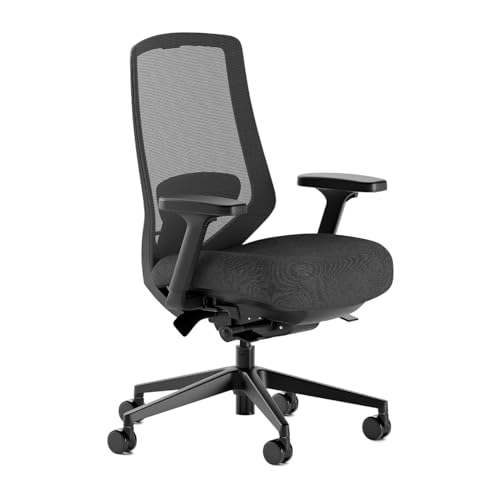
Branch Ergonomic Chair
$499.00 on Amazon (as of Sep 24, 2026) · Price and availability may change. Read our review
The alternate, and what both builds use, is a used Herman Miller Aeron or Steelcase Leap. Refurbished units from dealers run around $300 to $500 with a warranty; private listings for a Leap V1 or an older Aeron are often around $200 to $300, which the running total assumes.
Either used chair outlasts almost anything new under $400. Check the size (Aeron B fits most people) and walk away from torn mesh or a tilt that does not lock. Our best ergonomic chair under $500 guide has more options.
Desk: IKEA Karlby and Alex or FlexiSpot EN1/E5 (~$180–330)
The IKEA Karlby countertop on an IKEA Alex drawer unit is the standard budget programmer desk: a 74-inch wood-veneer top with a drawer unit at one end and a leg at the other, around $300 total. The lean version drops the Alex and puts the Karlby on two Adils legs, around $180 depending on length and current IKEA pricing. Both running totals use that version; add the Alex for about $100 if you want drawers.
IKEA sells direct, and Amazon listings are resellers at a markup, so use the link to check availability and buy from IKEA. The Karlby is 25.6 inches deep, a little short of the 30 inches we prefer.
If you want sit-stand inside the budget, the FlexiSpot EN1 is a single-motor frame with a top at around $250, and the FlexiSpot E5 is the dual-motor step up at around $330; check both, since FlexiSpot prices move monthly. The E5 is the first upgrade in the next-$500 list.
Monitor Arm: Amazon Basics or Ergotron LX (~$30–180)
The Amazon Basics single monitor arm costs around $30, clamps to the rear edge of the desk, and holds a 27-inch monitor at any height and distance. On a 25.6-inch-deep Karlby it pushes the screen back over the rear edge for viewing distance.

Amazon Basics Single Monitor Arm
$25.49 on Amazon (as of Sep 24, 2026) · Price and availability may change.
The Ergotron LX is the arm most people end up with eventually: around $180, a 10-year warranty, and a gas spring that holds position for years. It is outside this budget, so the full build uses the Amazon Basics arm. Our Ergotron LX review explains what the extra $150 buys.
Lighting: BenQ ScreenBar or Baseus i-Wok (~$40–109)
The BenQ ScreenBar sits on top of the monitor and lights the desk without glare on the screen, with adjustable color temperature and an auto-dimming sensor. It costs around $109 and is the fix for coding at night under a ceiling light that reflects off the panel.

BenQ ScreenBar
$199.00 on Amazon (as of Sep 24, 2026) · Price and availability may change. Read our review
The Baseus i-Wok does the same job for around $40, with a simpler clip, three color temperatures, and no auto-dimming. The light is close enough that the full build uses it.
Cable Management: Tray and Velcro (~$30)
A Cable Matters under-desk cable tray screws to the underside of the Karlby, holds a power strip and the monitor and dock bricks, and costs around $20. A roll of velcro ties adds $10. The whole line is $30 and it makes a $1,000 setup look like a $3,000 one.
Cable Matters Cable Tray
Prices change often. Check today's price on Amazon. Read our review
Route the power strip into the tray, run one cord to the wall, and let the monitor’s USB-C cable be the only one that reaches the laptop.

Running Total: The $800 Lean Build vs the $1,000 Full Build
| Line | Lean pick | Cost | Running | Full pick | Cost | Running |
|---|---|---|---|---|---|---|
| Monitor | Dell S2722DGM or 1440p IPS | ~$200 | $200 | Dell S2725QC 4K | ~$300 | $300 |
| Keyboard | Keychron V1 Max | ~$100 | $300 | Keychron V1 Max | ~$100 | $400 |
| Mouse | Logitech Lift | ~$70 | $370 | Logitech MX Master 3S | ~$90 | $490 |
| Chair | Used Leap or Aeron | ~$250 | $620 | Used Leap or Aeron | ~$250 | $740 |
| Desk | Karlby on Adils legs | ~$180 | $800 | Karlby on Adils legs | ~$180 | $920 |
| Monitor arm | Monitor stand | $0 | $800 | Amazon Basics | ~$30 | $950 |
| Lighting | Existing lamp | $0 | $800 | Baseus i-Wok | ~$40 | $990 |
| Cables | Tray and velcro | ~$30 | $830 | Tray and velcro | ~$30 | $1,020 |
Prices are approximate and move weekly; check before you buy. The full build drops under $1,000 by swapping the MX Master 3S for the Lift.
Where Should the Next $500 Go?
In this order:
- FlexiSpot E5 frame (+$150). Move the Karlby onto a dual-motor sit-stand frame. Nothing from the first build is wasted.
- Branch Ergonomic Chair (+$100 to $150 over a used chair) if the used market was thin. Skip this if you found a good Leap or Aeron.
- BenQ ScreenBar (+$70). Auto-dimming and better color control over the Baseus.
- Keychron K2 HE (+$30). Adjustable actuation is a real upgrade for all-day typing.
- Ergotron LX (+$150). The arm you stop thinking about.
That comes to around $500 and turns this list into the setup in our desk setup under $1,000 guide with a motorized desk under it.
Setup Tips for Day One
- Set the chair to the desk. With the Karlby at its fixed height, adjust the chair until your forearms are level with the top, and add a footrest if your feet lift.
- Push the monitor back. Set the screen 26 to 28 inches from your eyes with the top edge at eye level. On a stand, slide it to the rear edge.
- Update firmware first. Keychron’s launcher and Logitech Options+ both push Bluetooth fixes.
- Scaling. On the S2725QC, set macOS to “looks like 2560 by 1440.” Windows users on 4K should try 150 percent, and 100 percent on 1440p.
Who Should Buy This Build and Who Should Skip It
Buy this build if:
- You are starting from a laptop and a kitchen table.
- You spend the day in an editor and a terminal.
- You are willing to buy a chair used.
Skip this build if:
- You already have a desk and chair you like. Spend the same $1,000 on a 4K monitor, an Ergotron LX, and the K2 HE instead.
- You need two monitors on day one. A second 1440p panel and a dual arm push the total closer to $1,300.
- You will not buy used furniture. A new Branch chair takes the full build to around $1,150.
Bottom Line
The best coding setup under $1,000 in 2026 is a Dell S2725QC (or a 1440p panel on Windows), a Keychron V1 Max, a Logitech MX Master 3S or Lift, a used Steelcase Leap or Herman Miller Aeron, and an IKEA Karlby desk, with an Amazon Basics arm, a Baseus i-Wok light bar, and a cable tray filling the last $100. Spend the next $500 on a FlexiSpot E5 frame, then the BenQ ScreenBar and Keychron K2 HE.
Recommended Gear
Products we've reviewed that fit this guide. We may earn a commission if you buy through our links.


Frequently Asked Questions
- What is the best setup for coding on a budget?
- A 27-inch 1440p or 4K monitor, a 75 percent Keychron keyboard, a Logitech mouse, a used Steelcase Leap or Herman Miller Aeron, and an IKEA Karlby countertop desk. That list lands around $830 with a 1440p monitor and no extras, or around $1,000 with a 4K monitor, a monitor arm, and a light bar. Spend on the chair and monitor first.
- Is a 4K monitor worth it for programming?
- On a Mac, yes. macOS renders text sharply at 4K on a 27-inch panel and looks soft at 1440p because it no longer uses subpixel antialiasing. On Windows or Linux, a 27-inch 1440p monitor at 100 percent scaling is sharp enough for code and saves about $100. If the budget is tight and you use Windows, take the 1440p panel.
- Do I need a mechanical keyboard for coding?
- No, but a $100 Keychron V1 Max or a $130 Keychron K2 HE is the cheapest part of a setup that changes how eight hours of typing feels. A 75 percent layout keeps the arrow keys and function row that editors depend on while leaving room for the mouse. If you are happy with a laptop keyboard, put the $100 toward the chair.
- Is a used Herman Miller Aeron a good buy for a coding setup?
- Usually. Refurbished Aerons and Steelcase Leaps from dealers run around $300 to $500 with a warranty, and private listings for a Leap V1 are often lower. Check the size (Aeron B fits most people), test the tilt and the arm locks, and avoid chairs with torn mesh. A used Leap or Aeron outlasts most new chairs under $400.
- Should I buy a standing desk or a better chair first?
- The chair. You sit in it for most of a coding day, and a sit-stand desk you leave at one height is a fixed desk that cost $150 more. Buy a used Leap or Aeron or a new Branch chair, put a Karlby on Alex drawers, and add a FlexiSpot E5 frame later when the next $500 comes around.
Related Guides

Best Desk Setup for Programmers in 2026: Complete Coding Setup
The best desk setup for programmers in 2026: monitor, keyboard, mouse, chair, desk, and dock picks, plus three complete coding builds from $1,000 to $6,000+.

Best Desk Setups Under $1,000: Mid-Range Builds Worth Every Dollar
Five complete desk setups under $1,000 with full product lists. Mid-range builds that cover standing desks, mechanical keyboards, and quality monitors.

Best Mechanical Keyboard Under $100 in 2026
The best mechanical keyboards under $100 in 2026. Top pick: Keychron K2 Pro. Covers hot-swap, gasket vs tray mount, PBT keycaps, wireless, and Mac/Windows switching.

Best Ergonomic Chairs Under $500: Branch, Sihoo, and More
The best ergonomic office chairs under $500 in 2026. Covers the Branch Ergonomic Chair Pro, Sihoo Doro C300, and other value picks that don't compromise on back support.
Setup Inspiration
All setups →
White Minimal Desk Setup with Keychron and Monitor Light
A clean white minimal desk setup built around a white FlexiSpot desk, Keychron Q1 Pro keyboard, and BenQ ScreenBar lighting. Total cost: $1,290.
Total: $1,290

Budget Student Setup Under $400
A complete student desk setup for under $400 that handles studying, online classes, and casual browsing. Proof that great setups don't need huge budgets.
Total: $385

RGB Gaming Battle Station with Dual Monitors
A fully loaded gaming setup with dual monitors, custom mechanical keyboard, and tasteful RGB lighting. Built for competitive gaming and weekend streaming.
Total: $2,400