Best Mechanical Keyboard Under $100 in 2026
The best mechanical keyboards under $100 in 2026. Top pick: Keychron K2 Pro. Covers hot-swap, gasket vs tray mount, PBT keycaps, wireless, and Mac/Windows switching.

Quick picks: Best overall: Keychron K2 Pro | Best budget: Keychron C3 Pro | Best low-profile: NuPhy Air75 V2 | Best wireless budget: Royal Kludge RK84 | Best sound for the money: Akko 5075B Plus | Best budget gaming: Logitech G413 SE
We may earn a commission if you buy through our links.
A hundred dollars now buys a mechanical keyboard with hot-swap sockets, PBT keycaps, a gasket mount, and wireless, which is what $180 bought three years ago. The Keychron K2 Pro is the best of them: a 75% wireless board with QMK firmware that works as well on a Mac as on Windows and sells at or just under the $100 line. The other five cover a $40 wired starter, a low-profile board, a cheap tri-mode wireless option, the best sound per dollar, and a gaming board with a real warranty.

What to Look For
Hot-swap sockets. These let you pull switches and push in new ones without soldering. It is the single feature that keeps a budget board interesting, because you can change how it feels for the price of a switch pack. Most boards here have it; some brands sell soldered and hot-swap versions of the same model under the same name, so read the listing.
Gasket vs tray mount. Tray mount screws the plate directly into the bottom case. It is cheap and stiff, and the sound is sharper and louder. Gasket mount rests the plate on foam or silicone strips so it floats slightly, which softens the bottom-out and deepens the sound. Gaskets used to mean $150 or more; three of the boards here have them.
PBT vs ABS keycaps. ABS keycaps go shiny where your fingers land after a few months. PBT resists that and keeps its texture. Double-shot legends, where the letter is a second piece of plastic rather than printed on, never wear off. At this price, PBT double-shot is worth choosing over RGB.
Wireless. Tri-mode means Bluetooth, a 2.4GHz dongle, and a cable. Bluetooth is fine for typing and pairs to a laptop with no free port. The dongle has lower latency for games. Wired-only boards cost less and never need charging.
Mac/Windows switching. Keychron, NuPhy, and Akko boards have a physical toggle or key combo that puts Command and Option where a Mac expects them and include both keycap sets. Boards aimed at Windows gamers work on a Mac but you will remap modifiers yourself.
Best Overall: Keychron K2 Pro
The Keychron K2 Pro is a 75% layout with a function row and arrow keys, hot-swap sockets, double-shot PBT keycaps, a gasket mount, and Bluetooth plus wired connection. It runs QMK firmware, so every key can be remapped through the VIA web configurator without installing software, and a physical switch on the side moves between Mac and Windows layouts.
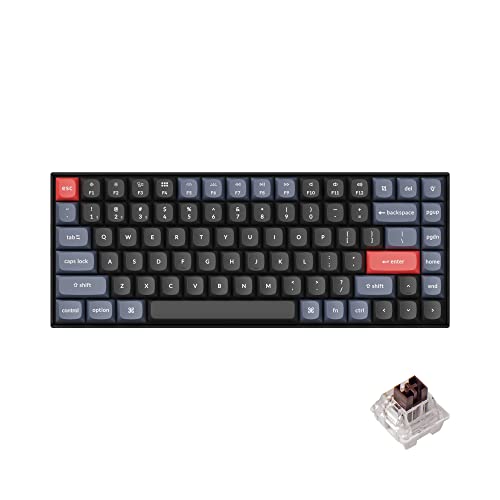
Keychron K2 Pro
$109.00 on Amazon (as of Sep 24, 2026) · Price and availability may change.
The plastic-frame, white-backlight version sits at or just under $100; the aluminum-frame RGB version costs more, so check which one you are looking at. The older Keychron K2 V2 shares the layout and Bluetooth but has ABS keycaps, no gasket, and no QMK, and usually sells for $20 to $30 less. Get the V2 only if the Pro is out of budget on the day.
Battery life is measured in weeks with the backlight off. It is a tall board, so a wrist rest helps.
Best Budget: Keychron C3 Pro
The Keychron C3 Pro is a wired tenkeyless board with a gasket mount, sound-dampening foam, and QMK/VIA support, at a price that has hovered between $35 and $50. Nothing else at that price comes with gaskets and programmable firmware. Switches are Keychron’s own red or brown.

Keychron C3 Pro
$54.99 on Amazon (as of Sep 24, 2026) · Price and availability may change.
The base version has soldered switches; Keychron sells an RGB variant with hot-swap sockets for a bit more. If you plan to try different switches later, pay for the hot-swap one. Keycaps are ABS double-shot rather than PBT, and the Mac layout is handled by a key combo rather than a physical switch.
For a first mechanical keyboard, or a second board for the office, this is where to start.
Best Low-Profile: NuPhy Air75 V2
The NuPhy Air75 V2 is a 75% board about half the height of a standard mechanical keyboard, with Gateron low-profile switches in hot-swap sockets, PBT keycaps, tri-mode wireless, and QMK/VIA firmware. It sits flat enough to type on without a wrist rest and slides into a laptop bag.

NuPhy Air75 V2
$57.14 on Amazon (as of Sep 24, 2026) · Price and availability may change.
List price is around $120, which puts it over the line. It drops to $100 or below during sales often enough to earn a spot here, but check the current price before assuming. If it is above budget, the older Air75 V1 is cheaper and still good, minus the tri-mode and VIA support.
Low-profile switches feel closer to a laptop than a full-height board. If you like the MacBook keyboard and want more travel, this is the right kind of board. If you want deep travel and a thocky sound, look elsewhere.
Best Wireless Budget: Royal Kludge RK84
The Royal Kludge RK84 gives you a 75% layout, tri-mode wireless, hot-swap sockets, and RGB for around $50 to $70. That combination was unusual at twice the price a few years ago. It comes with several switch options and a detachable cable.
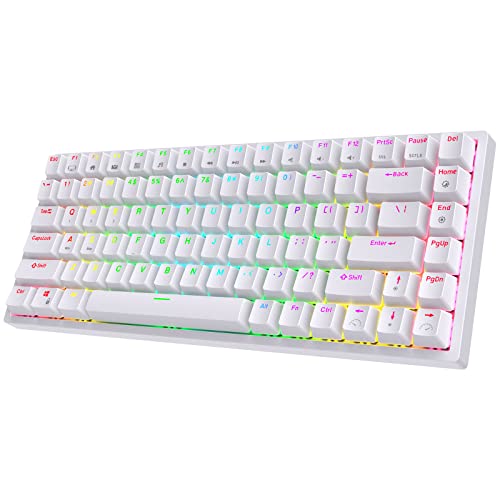
Royal Kludge RK84
$56.99 on Amazon (as of Sep 24, 2026) · Price and availability may change.
The trade-offs are the case and the software. The plastic body is tray-mounted and sounds hollow next to a gasket board, the stock keycaps are ABS on some versions and PBT on others, and RK’s configuration app is rough. Bluetooth pairing is reliable once set up. If you want smaller, the RK61 is the same recipe in a 60% layout without arrows, usually around $40 to $50.
Buy the RK84 for the wireless and the sockets, then improve it with a keycap set and a foam mod when you feel like it.

Best Sound for the Money: Akko 5075B Plus
The Akko 5075B Plus is a 75% board with a rotary knob, gasket mount, layers of foam, hot-swap sockets, PBT double-shot keycaps, and tri-mode wireless. Out of the box it sounds deeper and more even than anything else at its price, which has ranged from around $80 to just over $100 depending on the switch and color.
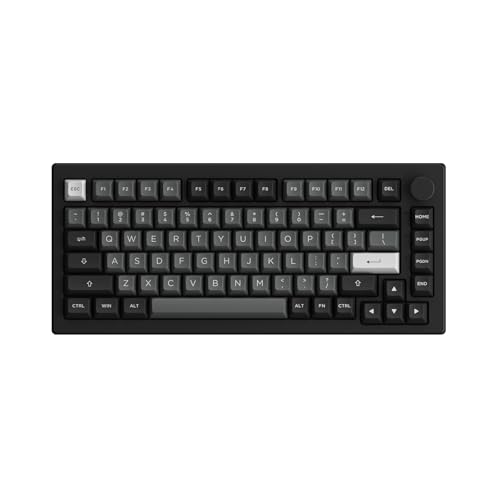
Akko 5075B Plus
$62.99 on Amazon (as of Sep 24, 2026) · Price and availability may change.
Akko’s own switches, such as the Cream Yellow linears, are pre-lubed and smooth. The board supports Mac and Windows layouts, and Akko’s software handles remapping. Some versions ship with VIA support; check the listing.
If you prefer a 65% layout without the function row, the Akko 3068B Plus is the same idea, a bit cheaper, and slightly less refined in sound because it uses a tray mount.
Best Budget Gaming: Logitech G413 SE
The Logitech G413 SE is a wired full-size board with tactile switches, PBT keycaps, an aluminum top plate, and white backlighting. It is not hot-swappable and has no gasket. What it has is a two-year Logitech warranty, keycaps that will not shine, and a top plate that does not flex.

Logitech G413 SE
$70.99 on Amazon (as of Sep 24, 2026) · Price and availability may change.
There is a TKL version if you want more mouse room. Prices have ranged from about $50 to $80, so check the current listing.
If you want to spend less, the Redragon K552 is the perennial $35 to $40 TKL gaming board with Outemu switches and a metal plate. Newer versions add hot-swap sockets. It is loud and the keycaps are ABS, but it has outlasted a lot of pricier boards on a lot of desks.
What to Skip
Skip any board listed only as “mechanical feel” or “mecha-membrane”. Those are rubber dome keyboards with a clicky sound and none of the benefits.
Skip soldered boards over $60. Hot-swap is standard at that price now, and the ability to change switches is worth more than RGB.
Skip 60% layouts as a first keyboard unless you know you will not miss the arrows. Arrow keys on a function layer are an acquired habit.
Skip boards whose listings will not name the switch. Brands that say “blue switch” without a maker are usually shipping the cheapest clone available.
Bottom Line
The Keychron K2 Pro is the board to buy under $100, and the K2 V2 is the fallback if it is out of budget. The Keychron C3 Pro is the best sub-$50 keyboard by a wide margin. The NuPhy Air75 V2 is for people who want low profile, when it is on sale. The Royal Kludge RK84 is the cheap way into tri-mode wireless with hot-swap, and the Akko 5075B Plus is the one that sounds best out of the box. The Logitech G413 SE is the gaming board that will still be working in five years.
Recommended Gear
Products we've reviewed that fit this guide. We may earn a commission if you buy through our links.


Frequently Asked Questions
- Is a $100 mechanical keyboard worth it over a $30 one?
- Usually, yes. The extra money buys hot-swap sockets, PBT keycaps that will not shine, a gasket mount with foam that sounds and feels better, and wireless that works reliably. A $30 board types fine but tends to be loud, hollow, and wired, with ABS keycaps that go glossy within a year. The middle of this range is where value peaks.
- What does hot-swappable mean?
- Hot-swap sockets let you pull switches out with a small tool and push new ones in without soldering. It lets you change the feel of the board later for the cost of a switch pack, and replace a failed switch in a minute. Most boards under $100 now include it; check the listing, since some brands sell soldered and hot-swap versions of the same model.
- Gasket mount or tray mount: does it matter under $100?
- It matters more than the switches for sound. Tray mount screws the plate straight into the case, which gives a stiffer, higher-pitched feel. Gasket mount sandwiches the plate between foam or silicone strips, so keys have slight flex and the sound is deeper and quieter. Several sub-$100 boards now use gaskets, which used to be a $150-and-up feature.
- Do these keyboards work with a Mac?
- All six work with macOS. The Keychron, NuPhy, and Akko boards have a physical Mac/Windows switch or a key combination that swaps Command and Option to the right positions and ship with Mac keycaps in the box. The Royal Kludge and Logitech boards work on a Mac but keep Windows legends, and you may need to remap modifiers in System Settings.
- Are PBT keycaps really better than ABS?
- For durability, yes. ABS keycaps develop a shiny, greasy look after months of use because the plastic wears smooth. PBT is harder and keeps its texture for years. The trade-off is that cheap PBT can have thinner legends and slightly rougher tolerances. On a board under $100, PBT is the feature that most changes how it looks after a year.
Related Guides

Best Mechanical Keyboards in 2026: Gaming, Typing, and Wireless
The best mechanical keyboards in 2026 for typing, gaming, and wireless use. Top pick: Keychron Q1 Pro. Covers switches, layouts, and who each one suits.

Best Keychron Keyboards in 2026: Q-Series vs. V-Series vs. K-Series
Which Keychron keyboard should you buy? A guide to the Q, V, and K series differences, and the best model for typing, gaming, and wireless use.

Best Wireless Mechanical Keyboards in 2026: No Lag, No Compromise
The best wireless mechanical keyboards in 2026, tested for connection stability, battery life, and typing feel. Top pick: Keychron Q1 Pro.

Best Mechanical Gaming Keyboards: Speed Switches, Rapid Trigger, and Feel
The best mechanical keyboards for gaming in 2026. Covers rapid trigger, analog switches, polling rates, and top picks for competitive and casual play.
Setup Inspiration
All setups →
Clean Minimal Developer Setup with Ultrawide Monitor
A distraction-free developer workspace featuring an ultrawide monitor, mechanical keyboard, and standing desk. Perfect for focused coding sessions.
Total: $1,850

Programmer Dark Mode Setup with Ultrawide and Mechanical Keyboard
A dark mode programmer setup with a 34-inch ultrawide, Keychron Q1 Pro, and bias lighting designed for long late-night coding sessions. Total cost: $1,320.
Total: $1,320

White Minimal Desk Setup with Keychron and Monitor Light
A clean white minimal desk setup built around a white FlexiSpot desk, Keychron Q1 Pro keyboard, and BenQ ScreenBar lighting. Total cost: $1,290.
Total: $1,290