Video Editor Desk Setup: Color Grading, Storage, and Speed
A video editor's desk setup optimized for long export queues, color accuracy, and fast NVMe storage access. Built for DaVinci Resolve and Premiere Pro users. Total cost: $2,460.
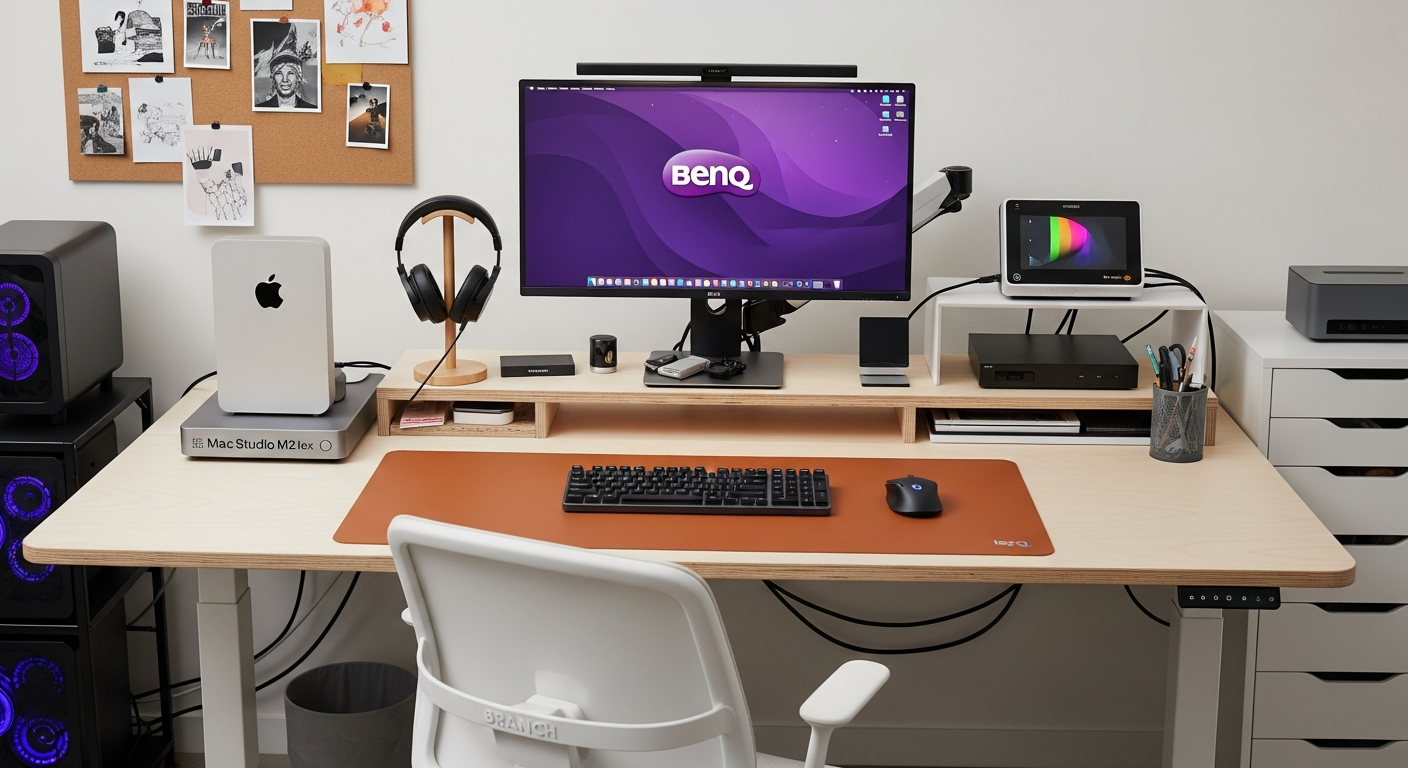
This setup is built for one job: editing and grading 4K footage without workflow bottlenecks. I chose every component to address a specific constraint I hit on previous setups. Slow storage killed timelines. An uncalibrated monitor destroyed color decisions. An uncomfortable chair ended long sessions early. All three problems have a direct solution here.
We may earn a commission if you buy through our links.
Color Accuracy: Monitor and Calibration
The centerpiece is the BenQ PD2725U 4K Creator Monitor at $699. It covers 99% of DCI-P3 and 100% of sRGB. The display ships factory-calibrated and comes with a report. Factory calibration is a good start. It is not a substitute for regular calibration.
I calibrate the display monthly using the X-Rite ColorMunki Display Calibrator at $149. The process takes about 15 minutes. The result is a display profile that DaVinci Resolve and Premiere Pro use to show accurate color. Without a hardware calibrator, you are grading against a display that may be running several Delta E units off from accurate. Clients watch on calibrated broadcast monitors. The gap matters.
The Ergotron HX Monitor Arm at $219 holds the display at eye level without the stock stand eating desk surface. The arm supports monitors up to 42 inches and 42 pounds, which handles the BenQ with clearance. This reclaimed about 8 inches of desk depth that the stand would have occupied.
The BenQ ScreenBar Monitor Light sits on top of the monitor. It illuminates the desk surface without creating reflections on the panel. Color grading in ambient light that does not contaminate the display is a genuine workflow advantage.
Storage and I/O: Thunderbolt Dock and External SSD
The Apple Mac Studio M2 Max at $1,999 is the machine. The M2 Max chip handles 4K ProRes exports in real time without the fan ramping. DaVinci Resolve’s Fusion effects run in real time on the GPU cores. What used to require render proxies now plays back directly. Export times that took 45 minutes on an Intel machine take under 12 minutes here.
The CalDigit TS3 Plus Thunderbolt Dock at $249 manages all peripheral connections from a single cable. The Mac Studio connects to the dock via Thunderbolt. From the dock: the BenQ monitor, the Samsung T7 SSD, the USB hub for additional drives, the keyboard, and the mouse all route through one connection. Disconnecting the single Thunderbolt cable unmounts everything simultaneously. Reconnecting it restores the full setup.
The Samsung T7 2TB External SSD at $159 holds active project media. The T7 connects via USB 3.2 Gen 2 and sustains around 1,000 MB/s read speeds. For 4K H.264 or ProRes footage, this bandwidth is sufficient for multicam timelines without dropped frames. I keep the internal SSD for the operating system and applications only. Media always lives on the T7.
Ergonomics: Desk, Chair, and Long Session Comfort
Long edit sessions demand a chair that supports the lower back for hours without causing fatigue. The Branch Ergonomic Chair Pro at $329 adjusts for lumbar depth, armrest height, and seat tilt. After switching from a fixed-back chair, the difference in how I feel after a six-hour grade session was immediate.
The UPLIFT V2 Standing Desk at 60 inches gives me a sit-stand option. I use the standing position for rough cuts and the sitting position for detailed color work. Standing during rough cuts reduces the mental inertia of long sedentary sessions. The motorized frame remembers two heights. Switching takes three seconds.
Cable management uses the CalDigit dock as the anchor. All cables terminate at the dock. The dock’s single Thunderbolt cable runs behind the monitor arm to the Mac Studio. A cable management spine runs vertically down the desk leg. The under-desk cable tray catches power strips and excess cable length. The surface stays clear.
What I’d Change
The Samsung T7, while fast, is a portable drive with a portable drive’s durability track record. I would add a dedicated NAS with RAID redundancy for project archives. Losing a drive with finished projects is not recoverable. A two-bay NAS with mirrored drives would close that gap.
I would also add a second monitor. A single 4K display works, but color grading in DaVinci Resolve benefits from a second screen for the node graph and timeline while the viewer stays full-size. A secondary 1440p display to the left would improve the grading workflow meaningfully.
The Branch chair is good. The Herman Miller Aeron is better. At double the price, it is a future upgrade rather than a current priority.
Gear in This Setup
BenQ PD2725U 4K Creator Monitor
$699
Samsung T7 2TB External SSD
$159
Apple Mac Studio M2 Max
$1,999
UPLIFT V2 Standing Desk 60-inch
$699
X-Rite ColorMunki Display Calibrator
$149
CalDigit TS3 Plus Thunderbolt Dock
$249
Ergotron HX Monitor Arm
$219
Branch Ergonomic Chair Pro
$329
Under Desk Cable Tray
$19
Large Leather Desk Mat
$79
Sony MDR-7506 Headphones
$99
USB Hub for Drives
$49
Cable Management Spine
$35
Velcro Cable Ties
$9
Headphone Stand
$29
Cooling Pad for NAS
$19
BenQ ScreenBar Monitor Light
$109
Logitech MX Keys Keyboard
$119
Logitech MX Master 3S Mouse
$99
Desk Drawer for Media
$39