The $1,500 Home Office Setup (2026): Exact Parts List and Why Each Pick
A complete $1,500 home office for 2026: standing desk, ergonomic chair, 4K USB-C monitor, keyboard, mouse, monitor light, and cable kit, with totals and swaps.

Quick picks: FlexiSpot E7 · Branch Ergonomic Chair Pro · Dell S2722QC · Keyboard · Logitech MX Master 3S · BenQ ScreenBar · Cable Kit · Running Total
We may earn a commission if you buy through our links.
This is a complete home office for around $1,500: desk, chair, monitor, keyboard, mouse, lighting, and cable management. Every part is a specific model, not a category, and each section explains why that model and not a cheaper or more expensive one. Prices are approximate and move with sales, so check the current price on each item.
The Philosophy
Spend on the chair and the desk. Save on everything else.
The reasoning is simple. The desk and chair are the two things your body is in contact with all day, they last the longest, and they are the hardest to upgrade later because they are big and annoying to sell. A keyboard, a mouse, and a monitor light are easy to replace in a year if you want something better. So this build puts roughly $950 into the desk and chair, then fills in the rest with the best value pick in each remaining category.
The other rule: one cable to the laptop. A monitor with USB-C and power delivery means a laptop plugs in with a single cable for video, data, and charging. It is the biggest quality-of-life improvement in a budget office and it costs nothing extra if you pick the right monitor.

The Desk: FlexiSpot E7
The FlexiSpot E7 is the standing desk we recommend most often, and at around $450 for the frame with a standard top it is the anchor of this build. It has dual motors, one in each leg, which lifts more smoothly and more quietly than the single-motor frames at $250 to $300. The frame is rated for well over 200 pounds, so a monitor arm, a desktop PC, and a pair of speakers do not make it wobble at standing height.
The keypad has memory presets, so you set a sitting height and a standing height once and tap between them. Cable management is your job, which is why there is a line item for a tray below. If you do not want a standing desk, a fixed desk around $200 saves $250 and the section on swaps covers where to put it. But the E7 is close enough in price to a good fixed desk that standing for an hour after lunch is almost free.
Choose the 55 or 60 inch top. Anything narrower makes a 27-inch monitor plus keyboard plus notebook feel cramped.
The Chair: Branch Ergonomic Chair Pro
The Branch Ergonomic Chair Pro is the best chair you can buy without crossing into Herman Miller and Steelcase territory. At around $500 it has the full adjustment set that cheaper chairs skip: adjustable lumbar height and depth, seat depth, seat height, tilt tension with a lock, and armrests that move in four directions. The back is mesh, the seat is foam, and the frame is metal rather than plastic.
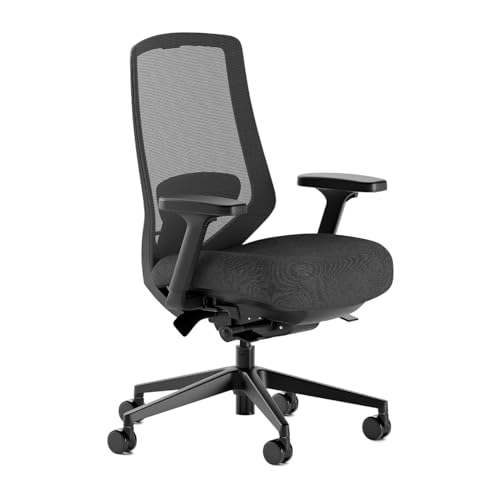
Branch Ergonomic Chair Pro
$499.00 on Amazon (as of Sep 24, 2026) · Price and availability may change. Read our review
Why this over a $200 chair? Adjustability. A chair that cannot move its lumbar support or seat depth fits one body shape, and it is probably not yours. Every adjustment on the Branch exists to make the chair fit you rather than the other way around. Why this over a $1,400 Aeron? Because the Aeron’s advantages, the multi-zone mesh and sacral support, matter most past six hours of daily sitting, and the difference is $900 you can spend on the rest of the office.
The Monitor: Dell S2722QC
The Dell S2722QC is a 27-inch 4K monitor with USB-C and 65W power delivery for around $300. That combination is what makes it the pick. Plenty of 27-inch 4K panels exist at this price; very few also charge a laptop over the same cable. Plug in a MacBook Air or a Windows ultrabook and you have display, charging, and the monitor’s two USB-A ports on one connection.
Dell S2722QC
Prices change often. Check today's price on Amazon.
The panel is IPS with a height-adjustable stand, tilt, and pivot. It is 60Hz and sRGB rather than wide gamut, which is fine for documents, spreadsheets, code, and video calls. It is not a monitor for color-critical design or gaming. If either of those is your job, the stretch build below swaps it for something better.
Run it at a scaled resolution that looks like 2560 by 1440. That gives you the sharpness of 4K with text large enough to read at arm’s length.
The Keyboard: Keychron K2 HE or Logitech MX Keys S
Two options here at about the same price, and which one you pick depends on whether you like a mechanical keyboard.
The Keychron K2 HE is a 75 percent wireless mechanical board with Hall effect magnetic switches, adjustable actuation, and Mac and Windows keycaps in the box. It connects over 2.4GHz or Bluetooth, and it is the pick if you want a satisfying typing feel or you game after work. Around $130, often less.

Keychron K2 HE
$139.99 on Amazon (as of Sep 24, 2026) · Price and availability may change. Read our review
The Logitech MX Keys S is the low-profile alternative for around $110. It is quiet, has a backlight that turns on when your hands approach, pairs to three devices, and shares Logitech’s Flow software with the mouse below so one keyboard and mouse can move between two computers. Pick this if you type in a shared room or prefer a laptop-style key.

Logitech MX Keys S
$119.99 on Amazon (as of Sep 24, 2026) · Price and availability may change.
The Mouse: Logitech MX Master 3S
The Logitech MX Master 3S is the default productivity mouse and, now that the MX Master 4 exists, regularly sells for around $80 to $99. The sculpted shape supports the whole hand, the main scroll wheel free-spins through long documents, the thumb wheel handles horizontal scroll, and the 8,000 DPI sensor tracks on glass. It connects to three devices and switches with a button underneath.

Logitech MX Master 3S
$89.99 on Amazon (as of Sep 24, 2026) · Price and availability may change. Read our review
Why not the MX Master 4? It adds a haptic thumb area and costs more. For a budget build the 3S does the same job for less, and the price gap is better spent elsewhere.
The Light: BenQ ScreenBar
The BenQ ScreenBar clips to the top of the monitor and lights the desk surface without putting any glare on the screen. It is the original monitor light bar, costs around $109, and is the accessory people are most surprised to find they cannot work without. It runs off a USB port, auto-dims to the room, and adjusts from warm to cool white.

BenQ ScreenBar
$199.00 on Amazon (as of Sep 24, 2026) · Price and availability may change. Read our review
It replaces a desk lamp, which frees surface space, and it stops the contrast problem of a bright screen in a dark room that causes eye strain by late afternoon. The Halo version adds a rear bias light and a wireless dial for around $70 more, which is a stretch-build upgrade, not a necessity.
Cable Management: Tray and Velcro
Budget around $30 for an under-desk cable tray and a roll of Velcro cable ties. The tray screws or clamps to the underside of the desk and holds the power strip and the mess of adapters. The Velcro bundles cables into a single run down one leg of the desk. On a standing desk this is not optional: cables that hang loose will catch as the desk rises.

Under-Desk Cable Management Tray
$21.59 on Amazon (as of Sep 24, 2026) · Price and availability may change.
This is the cheapest line in the build and the one that decides whether the finished desk looks like an office or a server closet.

Running Total
All prices are approximate list or typical street prices. Sales on the desk and chair are frequent and can pull the total down by $100 or more.
| Item | Approximate Price |
|---|---|
| FlexiSpot E7 standing desk | $450 |
| Branch Ergonomic Chair Pro | $500 |
| Dell S2722QC 27-inch 4K USB-C | $300 |
| Keychron K2 HE or Logitech MX Keys S | $110 to $130 |
| Logitech MX Master 3S | $80 to $99 |
| BenQ ScreenBar | $109 |
| Cable tray and Velcro ties | $30 |
| Total | ~$1,580 to $1,620 at list; around $1,500 with typical sale pricing |
The list total runs slightly over $1,500. In practice the E7 and the Branch chair are discounted often enough that landing at or under $1,500 is realistic if you wait for a sale on either. If you need to hit the number today, take the MX Keys S over the K2 HE and buy the mouse on sale.
Swaps to Hit $1,000 or Stretch to $2,000
To get to $1,000: replace the E7 with a fixed desk around $200 and the Branch Pro with the standard Branch Ergonomic Chair at around $330. Keep the monitor; the one-cable setup is worth protecting. Drop the ScreenBar for now and add it later. That brings the build to roughly $1,050 before sales.
To stretch to $2,000: add the Ergotron LX monitor arm at around $180 first; it clears the desk and makes the standing desk work properly. Then swap the Dell S2722QC for the Dell U2723QE at around $600 to get a full USB hub, Ethernet, and better contrast. Upgrade the ScreenBar to the Halo. That lands around $2,000 and is a desk you will not need to touch for years.
Bottom Line
Put the money in the desk and the chair, buy a 4K monitor with USB-C so the laptop needs one cable, and fill in the keyboard, mouse, and light with the proven picks. The result is a home office that is comfortable for a full workday, tidy, and around $1,500. Nothing in it is a compromise you will feel, and everything outside the desk and chair is easy to upgrade whenever you want.
Recommended Gear
Products we've reviewed that fit this guide. We may earn a commission if you buy through our links.


Frequently Asked Questions
- Is $1,500 enough for a good home office setup?
- Yes, if you spend it in the right order. Around two thirds of the budget should go to the desk and chair, because those are the two things your body touches for eight hours. A dual-motor standing desk and a fully adjustable mesh chair fit inside $1,000 together, leaving $500 for a 4K monitor, keyboard, mouse, and lighting.
- Why spend $500 on a chair instead of a better monitor?
- A monitor upgrade from $300 to $600 buys you a USB hub and slightly better color. A chair upgrade from $150 to $500 buys adjustable lumbar, seat depth, and armrests that prevent back and shoulder pain over years of use. The chair also lasts longer: a good one runs a decade, while monitors get replaced every four or five years.
- Do I need a standing desk in a $1,500 home office?
- You do not need one, but at around $450 the FlexiSpot E7 is close enough in price to a quality fixed desk that the ability to stand for part of the day is nearly free. If you would rather not, swap in a fixed desk around $200 and put the difference toward a monitor with a built-in USB-C hub.
- Is a 4K monitor worth it for office work?
- At 27 inches, yes. Text at 4K is sharper than at 1440p and much sharper than 1080p, which matters when you read documents and code all day. The Dell S2722QC also carries USB-C with 65W power delivery, so a laptop connects and charges with one cable. It is one of the cheapest ways to get that combination.
- What should I add first if I have more than $1,500?
- A monitor arm. The Ergotron LX at around $180 frees the desk surface, lets you set screen height exactly, and makes a standing desk far more useful because the monitor moves with you. After that, a dedicated webcam and headphones if you spend a lot of the day on calls, then a desk mat and a second monitor.
Related Guides

Best Desk Setups Under $1,000: Mid-Range Builds Worth Every Dollar
Five complete desk setups under $1,000 with full product lists. Mid-range builds that cover standing desks, mechanical keyboards, and quality monitors.

How to Set Up a Home Office in 2026: The Complete Guide
A step-by-step guide to setting up a productive home office in 2026. Covers location, desk choice, ergonomics, lighting, and internet setup.

Best Standing Desks in 2026: Tested and Ranked
The best standing desks in 2026, ranked by stability, motor quality, and value. Top pick: FlexiSpot E7. Updated September 2026.

Best Ergonomic Chairs Under $500: Branch, Sihoo, and More
The best ergonomic office chairs under $500 in 2026. Covers the Branch Ergonomic Chair Pro, Sihoo Doro C300, and other value picks that don't compromise on back support.
Setup Inspiration
All setups →
Triple Monitor Trading Desk Setup Under $3,000
A triple monitor trading setup with three 27-inch displays, a standing desk, and full cable management. Built for active traders who need data on every screen. Total cost: $2,750.
Total: $2,750

Walking Pad and Standing Desk Setup for Active Work Days
A walking pad treadmill under-desk setup paired with a standing desk for active work sessions. Built for remote workers who want to move while they work. Total cost: $1,430.
Total: $1,430

Clean Standing Desk Setup with Zero Visible Cables
How I eliminated all visible cables from my standing desk setup using a cable spine, under-desk tray, and velcro. Full product list included.
Total: $850