Ergonomic Mechanical Keyboards: Split, Angled, and Low-Profile Picks
The best ergonomic mechanical keyboards in 2026: split layouts, tented designs, and low-profile options for wrist comfort and all-day typing.
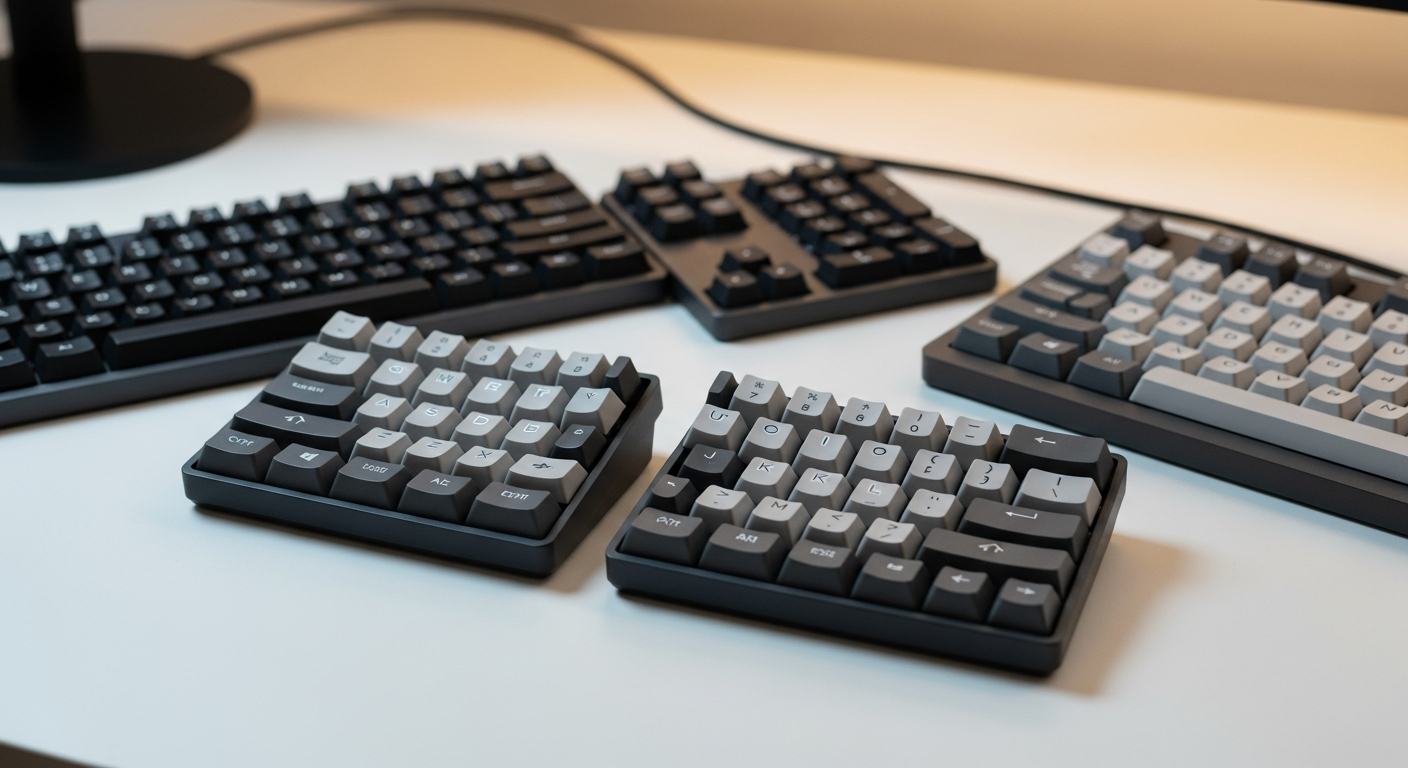
Quick picks: Best split overall: ZSA Moonlander | Best wireless split: Dygma Defy | Best low-profile: Keychron K3 Pro | Best for serious ergonomics: MoErgo Glove80 | Best budget: Microsoft Sculpt
We may earn a commission if you buy through our links.
What to Look For
Split vs. Columnar-Stagger vs. Low-Profile
Standard keyboards arrange keys in staggered rows that date back to typewriter designs. Your fingers naturally move up and down, not diagonally. This mismatch contributes to hand strain over long sessions.
Split keyboards separate the two halves completely. You position each half at shoulder width. This eliminates the inward rotation that strains wrists and forearms. Most split keyboards also allow independent tilt adjustments for each half.
Columnar-stagger layouts align keys in vertical columns instead of diagonal rows. Each finger travels straight up and down to reach its row. Boards like the MoErgo Glove80 and ZSA Moonlander use columnar layouts. There is a learning curve. Most people need two to four weeks to relearn their muscle memory.
Low-profile keyboards keep both halves connected but reduce key height. This lowers the angle your wrists must bend to reach the keys. They require less desk space and no wrist rest. The typing feel is different: shorter travel, lighter actuation, and a softer bottom-out.
Tenting
Tenting tilts the keyboard so the thumb side sits higher than the pinky side. This puts your hands in a more natural handshake position. It reduces forearm pronation, which is a major cause of repetitive strain injury.
Most ergonomic boards offer tenting legs built into the case. High-end boards like the Moonlander support extreme tent angles using optional stands. Even 5-10 degrees of tent makes a measurable difference in forearm comfort.
ZSA Moonlander
The ZSA Moonlander is the best split mechanical keyboard for most people. It splits completely into two halves connected by a cable. The columnar-stagger layout takes adjustment. After two weeks, most typists report noticeably less hand strain.
The thumb clusters are a signature feature. Four keys under each thumb replace the awkward reaches to Backspace, Enter, and Shift on standard boards. ZSA’s Oryx configuration tool runs in the browser. You remap every key and set layers without installing software. The build quality is excellent. Aluminum plates and quality switches give it a premium feel.
At $365, it’s a significant purchase. ZSA ships worldwide and offers a 30-day trial period. For anyone with wrist pain from typing, the price is easy to justify.
Dygma Defy
The Dygma Defy is the best wireless split keyboard available. It connects via 2.4GHz wireless to both halves simultaneously. Battery life is roughly 40 hours per charge across both halves. The case supports adjustable tenting legs.
The layout is similar to the Moonlander with thumb clusters on both sides. Dygma’s Bazecor software handles key remapping and layer configuration. The board supports hot-swap switches, so you can tune the feel after purchase.
The Defy costs $349 and up depending on configuration. That’s a lot for any keyboard. But it’s the only fully wireless split with this level of build quality and configurability. If your desk needs to be cable-free, this is the one.
Keychron K3 Pro
The Keychron K3 Pro is the best low-profile ergonomic keyboard. It uses Keychron’s low-profile optical switches in a compact 75% layout. The key height is roughly half that of a standard keyboard. No wrist rest is needed on most desk heights.
It’s not a split board. But the lower typing angle reduces wrist extension compared to standard-height keyboards. For people who want ergonomic benefits without the learning curve of a split layout, this is the right starting point.
Wireless tri-mode connectivity (USB, 2.4GHz, Bluetooth) is included. The aluminum frame is solid. The price sits around $100. It’s one of the few low-profile mechanical keyboards with hot-swap support at this price.
MoErgo Glove80
The MoErgo Glove80 is built for people with serious repetitive strain injury or those who want the maximum ergonomic benefit. It uses a curved key well that matches the natural arc of your fingers. Each column follows the length of each finger precisely.
The board is wireless and splits into two halves. 80 keys cover everything you need without layers. The columnar layout is stricter than the Moonlander. The adjustment period is longer. But users who commit to it report the best long-term outcomes of any keyboard in this list.
It’s not for casual users. The $399 price and steep learning curve make it a serious tool for people who type professionally and have pain to address.
Microsoft Sculpt
The Microsoft Sculpt is the best budget ergonomic keyboard. It costs around $60 and uses a traditional membrane switch under a split-angle design. The two halves are fixed in position, unlike true split boards.
It’s not mechanical. The typing feel is soft and quiet. But the ergonomic shape reduces wrist deviation and the attached wrist rest keeps hands at a reasonable angle. For someone testing ergonomic keyboards for the first time, it’s a low-risk entry point.
The wireless dongle connection is reliable. The keyboard is widely available. It runs on AA batteries for months. The limitations are real: no key remapping, no tenting, and membrane switches feel mushy compared to mechanical boards. But at $60, it does a lot.
Bottom Line
Start with the ZSA Moonlander if wrist pain is your reason for switching. The columnar layout and thumb clusters address the root causes of typing strain. Buy the Dygma Defy if wireless is a hard requirement. Choose the Keychron K3 Pro for low-profile benefits without the split keyboard adjustment period. The MoErgo Glove80 is for committed users who want the most ergonomically optimized board available. And the Microsoft Sculpt is the right first step if you’ve never used an ergonomic keyboard and want to test the concept cheaply.
Frequently Asked Questions
- Do ergonomic keyboards actually reduce wrist pain?
- Split and tented keyboards reduce ulnar deviation, the sideways bending of the wrist that causes strain. Many people report reduced wrist and forearm fatigue within a few weeks. Results vary, and they're not a substitute for proper desk ergonomics.
- What is a split keyboard?
- A split keyboard separates the left and right halves of the key layout so each hand can be positioned independently. This lets you set the angle and distance of each half to match your shoulder width and natural hand position.
- Are low-profile keyboards better for ergonomics?
- Low-profile keyboards reduce the wrist extension angle needed to reach the keys, which reduces strain. They're a good option if you don't want a wrist rest and prefer a flatter typing angle. The tradeoff is less typing depth and a different feel from standard switches.
- What is keyboard tenting?
- Tenting tilts the keyboard so the thumb side is higher than the pinky side, which puts your hands in a more natural pronated position. Most ergonomic keyboards offer tenting through adjustable legs or purpose-built stands.